Set up a team out-of-office calendar in Google Calendar,and know who's out before you promise a date.

If your team runs on Google, you can see who's out this week without buying anything. The trick is that Google's Out of office button does only half the job: it declines meetings on your own calendar, but nobody else can see it on a shared one. This is how I'd set it up for a six-person team: one shared calendar, US holidays next to it, time off on it as all-day events, and Out of office on top for the auto-declines.
Twenty minutes, nothing to install, and the whole team can keep it current. At the end I'll show you where Google Calendar runs out, so you can decide if it's enough.
What you'll end up with
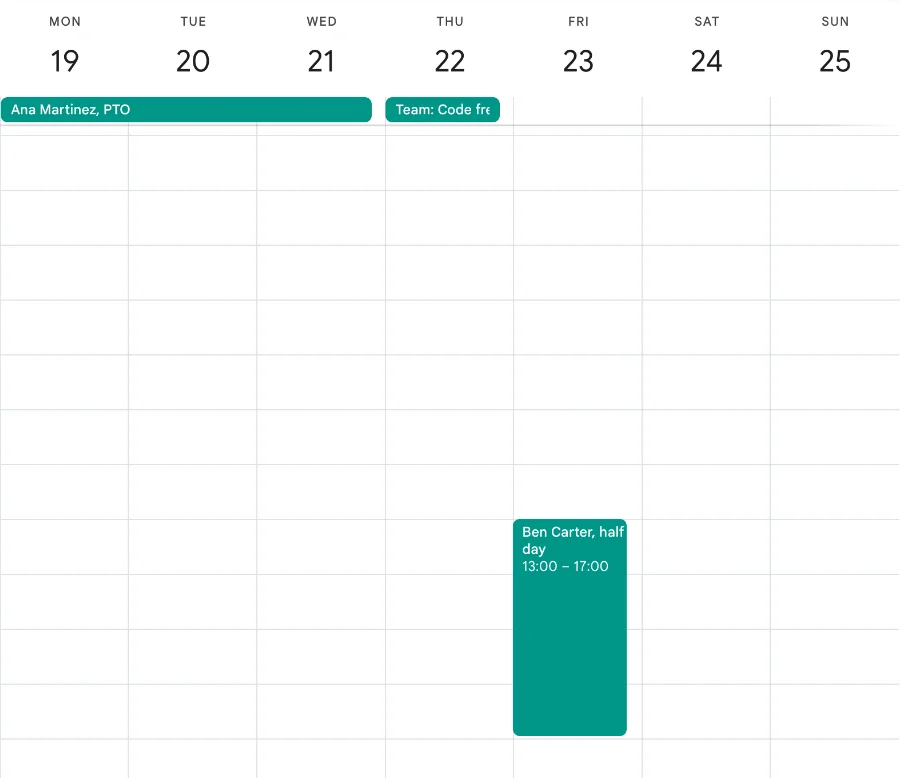
Here's the finished week with only the team calendar ticked: Ana out Monday to Wednesday, a code freeze on Thursday, and Ben on a half day Friday afternoon. Everyone on the team sees this next to their own meetings.
Step 1
Add US public holidays
In the left pane, next to Other calendars, click + and choose Browse calendars of interest. Under Regional holidays tick Holidays in the United States. Google adds a read-only calendar in two parts you can tick separately: Public holidays, the federal days, and Other observances, which adds Halloween, Black Friday and the end of daylight saving.
Everyone on the team does this once for themselves. You can't push it to other people's calendars, which is why step 2 matters.
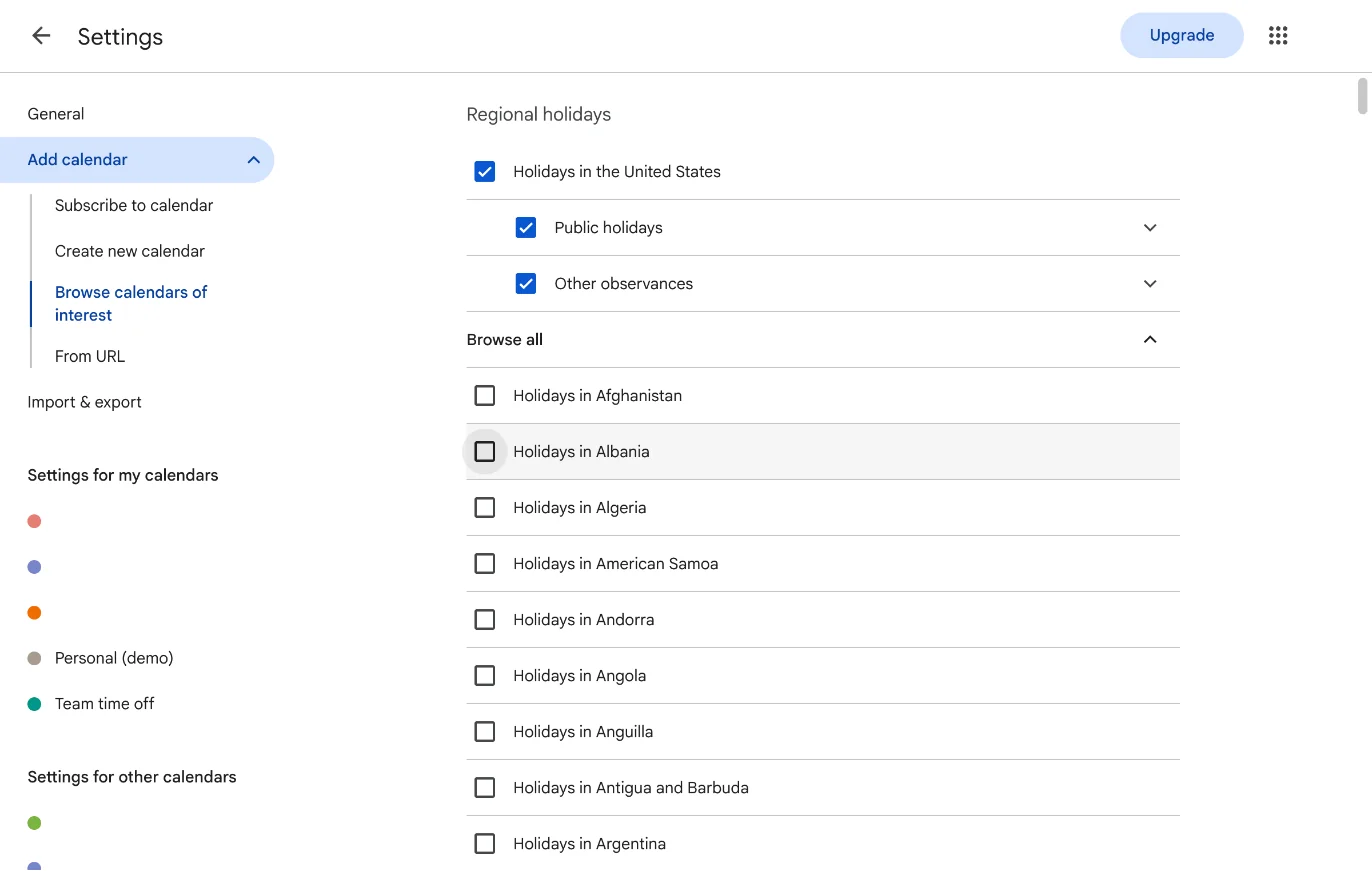
Settings, Add calendar, Browse calendars of interest. The holidays calendar has a federal part and an observances part. 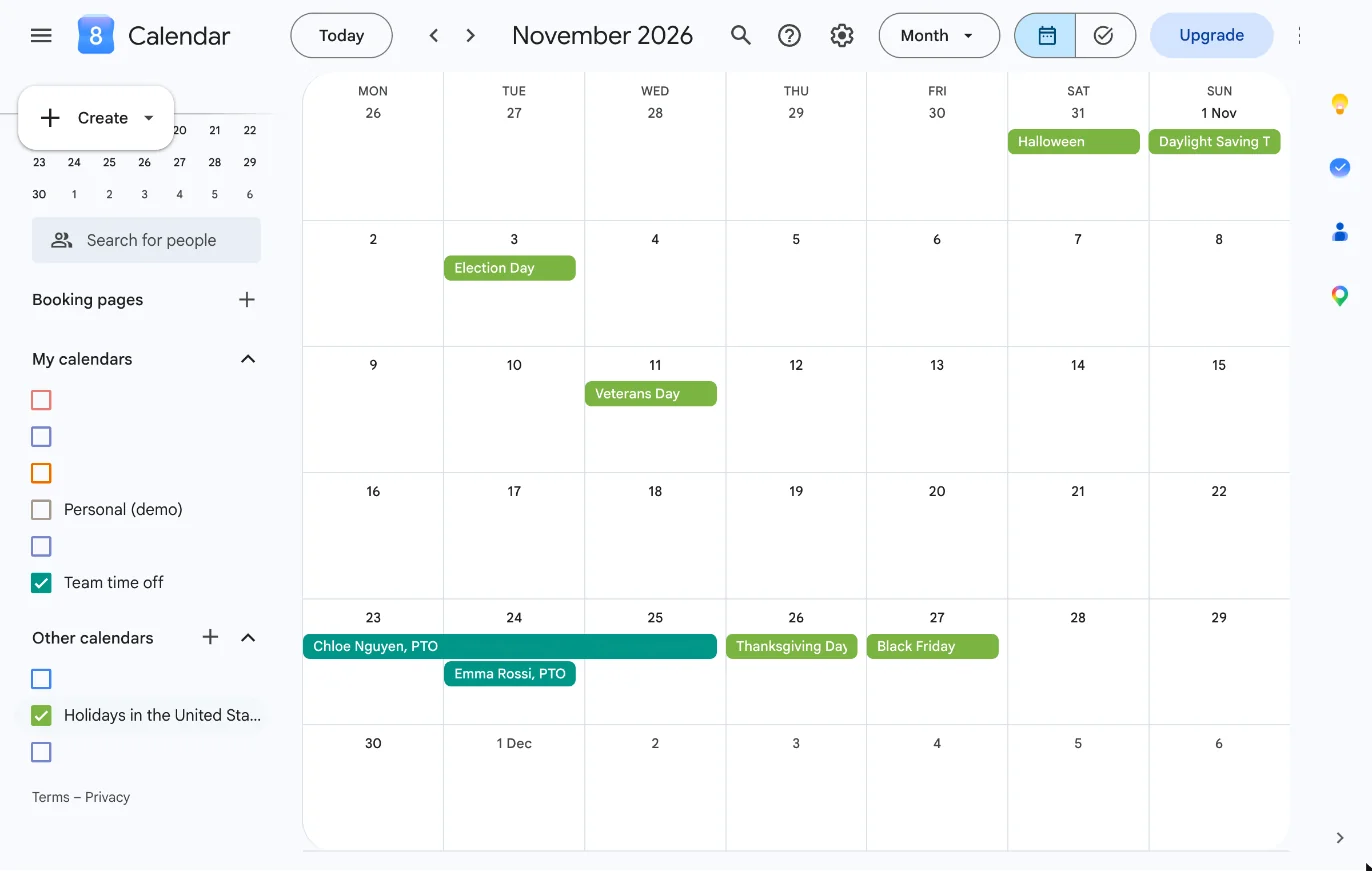
Thanksgiving week, with the holidays in green and the team's time off in teal. Google lists the Friday as Black Friday, under Other observances. Step 2
Create one shared calendar the whole team can edit
Click + next to Other calendars again and choose Create new calendar. Name it Team time off, set the time zone to where most of the team sits, and click Create calendar. It appears under My calendars, because you own it.
To share it, open Settings (the gear), click Team time off under Settings for my calendars, and under Shared with click Add people and groups. Add your team's Google Group (team@yourcompany.com) or each person, and set Permission to Make changes and see all event details. Give your manager or PM See event details. Each person then ticks the calendar in their left pane and it shows up next to their own.

Create new calendar. Only the name matters; the time zone defaults to yours. 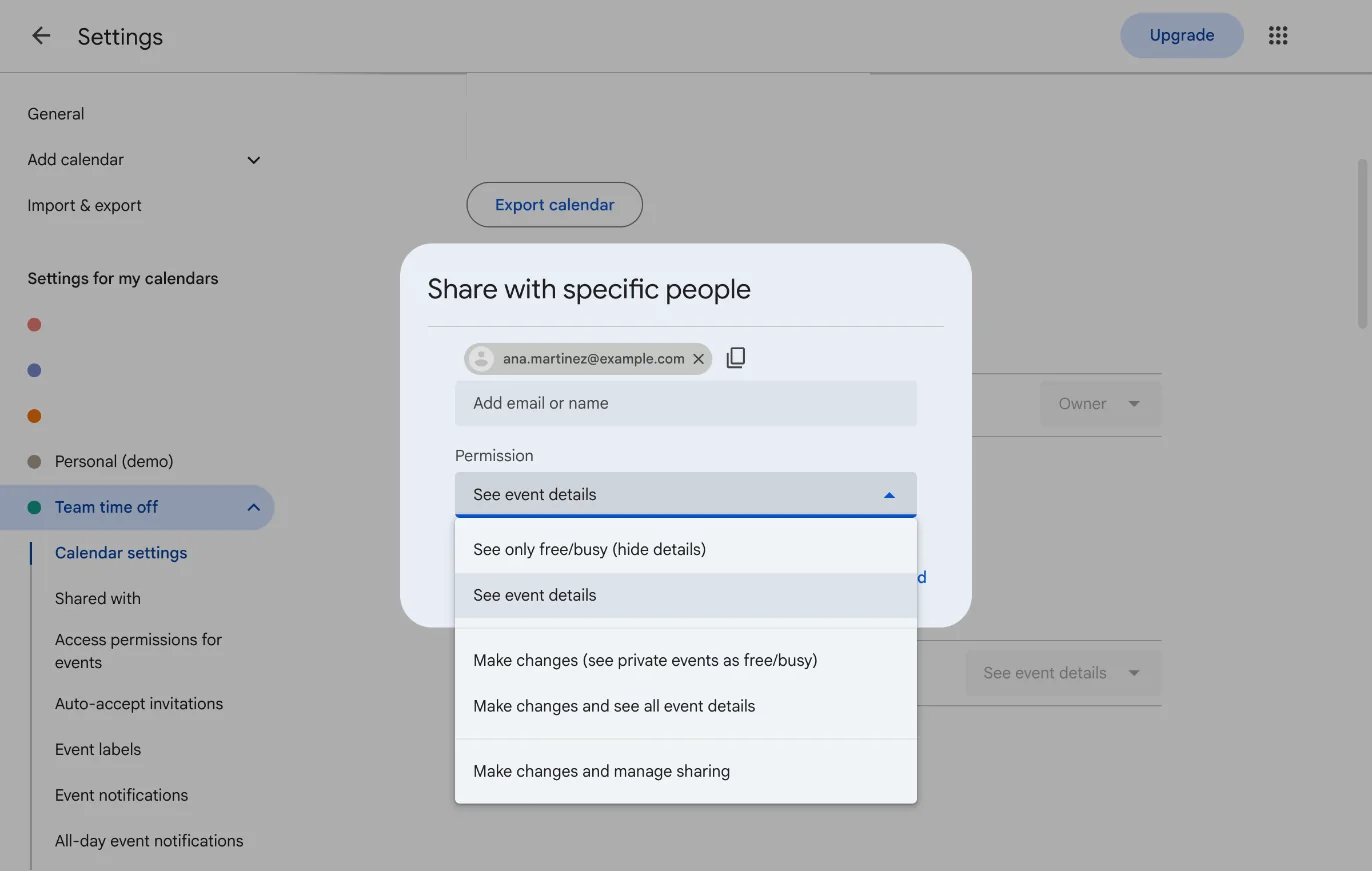
Shared with, Add people and groups. Pick Make changes and see all event details for the team. Step 3
Put time off on the shared calendar as all-day events
Click Create, then Event, and type the person's name and the kind of absence, like Ana Martinez, PTO. Click More options, tick All day, set the first and last day, and in the calendar dropdown pick Team time off instead of your own calendar. Save. Half days are timed events on the same calendar, Ben Carter, half day from 1:00 PM to 5:00 PM.
Now the honest part about Google's Out of office event type. It exists only on Google Workspace accounts, and only on your own calendar: pick Team time off and the option is gone. So each person does two things: an all-day event on Team time off so the team sees it, and an Out of office on their own calendar so meeting invites for those days get declined automatically with a message.
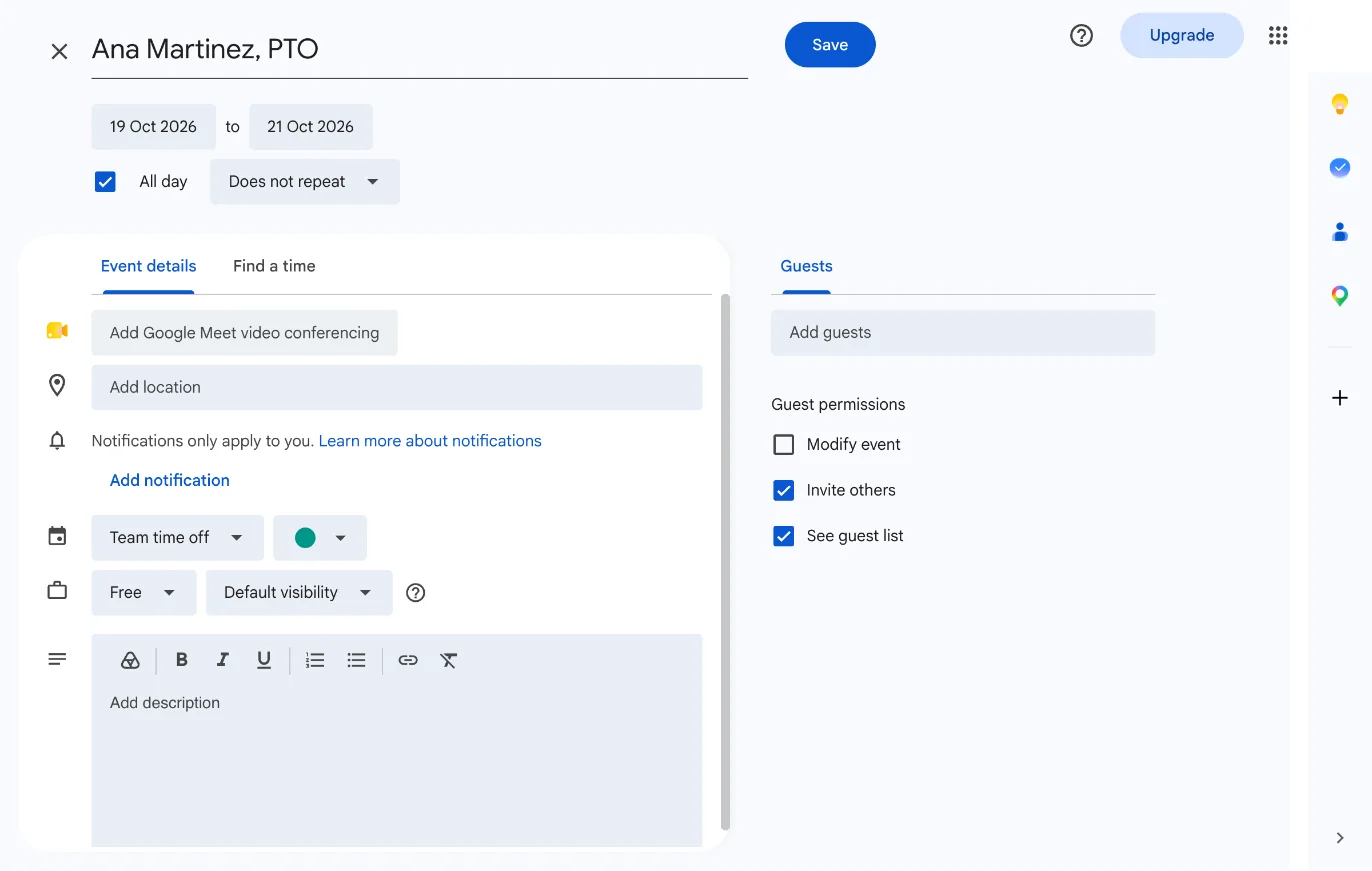
The full editor: All day, three days, and the calendar switched from your own to Team time off. Step 4
See who's out this week
Tick your own calendar and Team time off in the left pane and switch to Week. The team's all-day events sit in the strip along the top of the week in the shared calendar's color, and half days show as blocks next to your own meetings.
Under Settings, View options, untick Show weekends if your team doesn't work them, and turn on View calendars side by side in Day view for a busy week. On your phone, open the Google Calendar app, Settings, your account, and tick Team time off under Show more so it syncs.
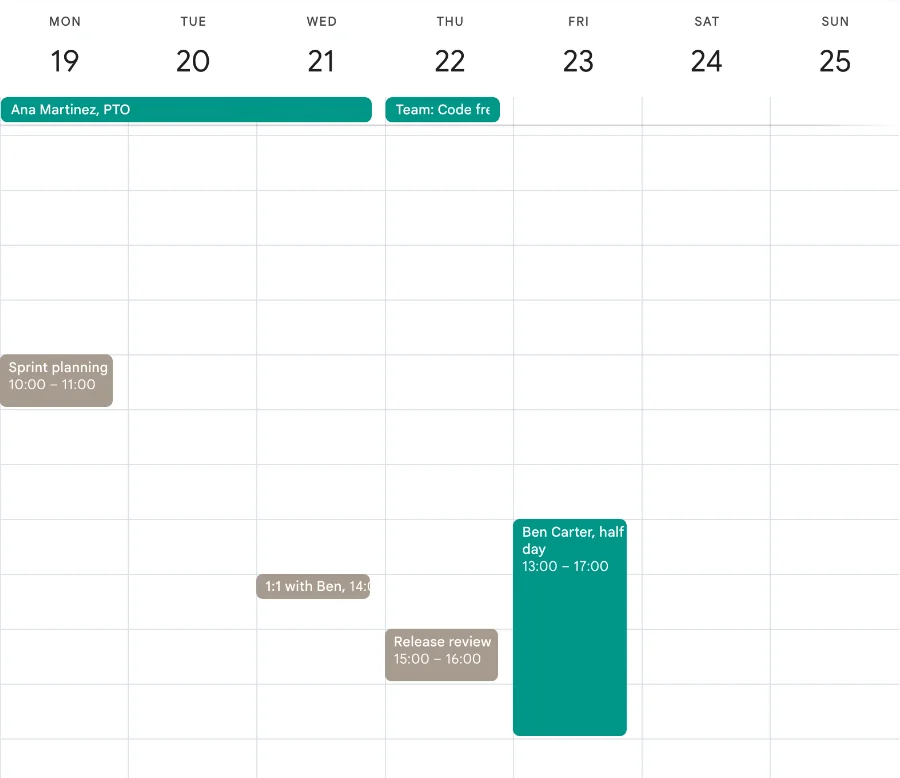
Your own calendar and Team time off together. The 1:1 with Ben on Wednesday is fine; the release review on Thursday lands on the code freeze. Step 5
Put company days on the same calendar
Code freeze, release week, the offsite, the company day off that isn't a federal holiday: all-day events on Team time off with a Team: prefix, like Team: Code freeze or Team: Release 4.2. Leave them as normal events, not Out of office, so nobody's meetings get declined.
One calendar now answers both questions a team lead asks on Monday: who's out, and what's happening.
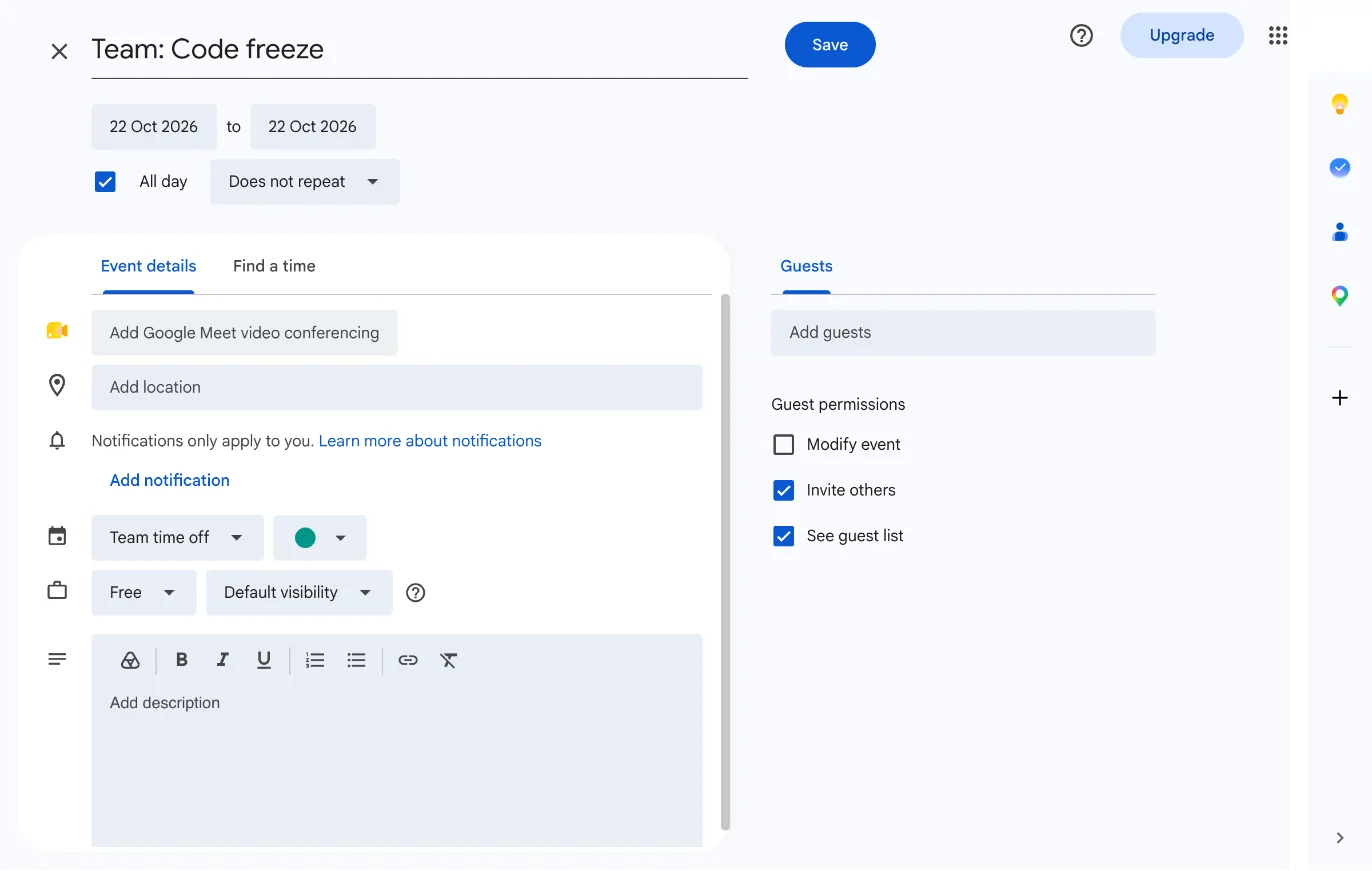
A company day is the same all-day event with a Team: prefix, so it sorts next to the people in the strip.
Six tips that make it stick
Share with a Google Group
Add team@yourcompany.com once with Make changes and see all event details, and every new teammate gets the calendar automatically.
Put the time zone in the title for remote people
“Chloe Nguyen, PTO (Pacific)” saves the Eastern half of the team a mental conversion.
Use Working location for remote days
Workspace's working-location feature shows office or home per day without cluttering the time-off calendar.
Subscribe from Outlook or Apple Calendar
The calendar's settings have a Secret address in iCal format. Paste it into Outlook or Apple Calendar for teammates who don't live in Google.
Check it in Monday standup
Thirty seconds on the week view at the start of the week catches most “oh, I didn't know” moments.
Make the manager an owner too
Give one other person Make changes and manage sharing, so the calendar survives when you're the one on vacation.
Google Calendar is enough for a small team.Here's where it stops.
If you have five people in one time zone and no release dates to protect, stop here. The shared calendar does the job. These are the three places it broke for me as the team grew, and what the same week looks like on a Forgot board.
Everyone shares one strip
All-day events stack in the strip at the top of the week, one line each, in the order Google picks. With eight people and three absences, you're reading titles, not seeing a shape, and you can't tell at a glance that Backend is down to one person on Thursday.
It can't see your release date
A release is an event like any other. Nothing tells you the date you set in planning lands in the week two of the three people who know that service are away.
Every entry is typed twice
The all-day event for the team and the Out of office for the auto-decline are two entries per absence. The second one gets skipped, and the time zone still lives in each person's head.
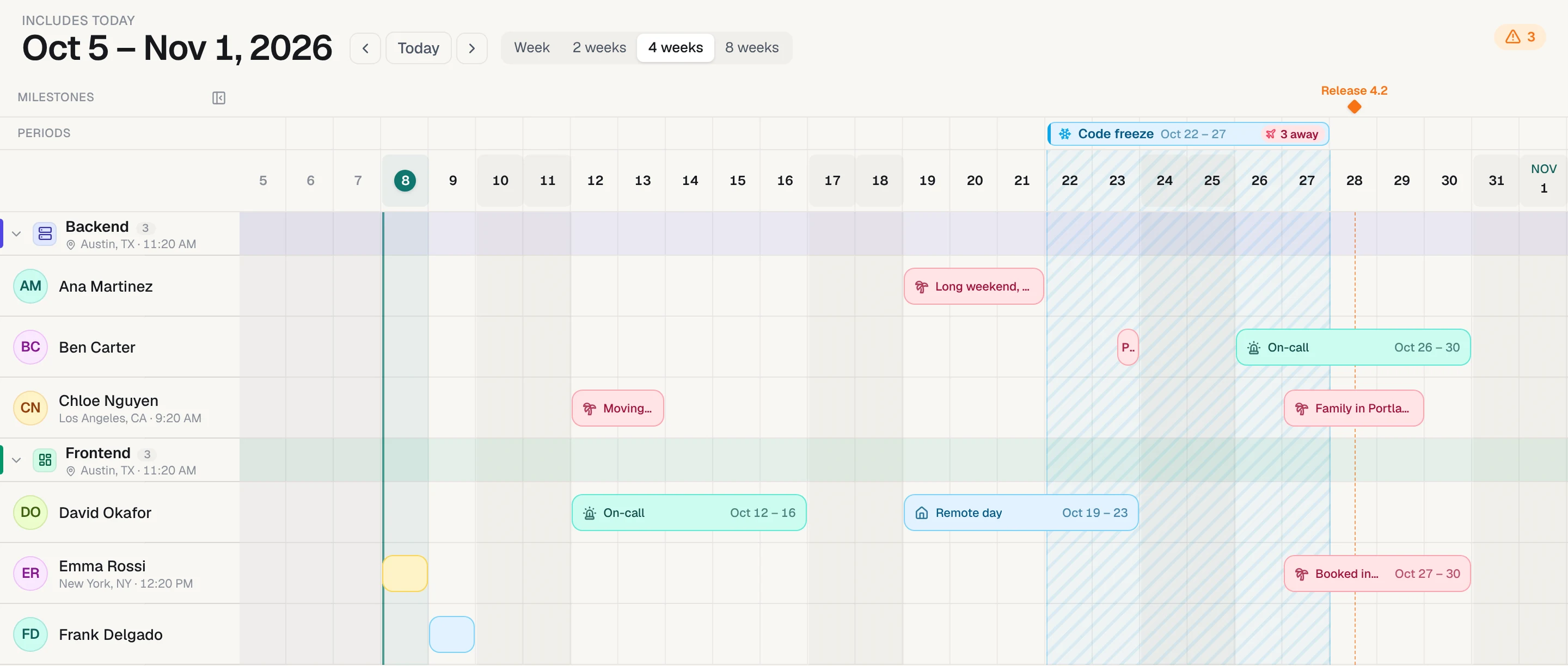
Keep Google Calendar. Add a timeline for the team.
Paste your team's names into Forgot and you get one row per person, public holidays for each person's country, a milestone for every release date, and a warning when someone is away on it. Your team never has to sign up; they open a read-only link.
- One row per person, 4 to 12 weeks wide
- Public holidays for each teammate's own country
- A warning when someone's away on a release date
- A read-only link for the team. Nobody has to sign up.
No card needed. After the trial it's a one-time payment, not a subscription.
Questions
How do I set out of office in Google Calendar?
On a Google Workspace account, click Create, choose Out of office, pick the days, decide whether to decline new and existing meetings, write the decline message, and save. It only exists on your own calendar, so put a normal all-day event on the team's shared calendar too if your teammates need to see it. Personal Google accounts don't have the Out of office type; use an all-day event.
Can my team see my out of office in Google Calendar?
Only if they have access to your calendar and look at it. An Out of office event doesn't appear on a shared calendar. The reliable way is a shared team calendar where everyone adds their time off as all-day events.
How do I add US holidays for the whole team?
You can't push the Holidays in the United States calendar to other people. Each person adds it under Browse calendars of interest, or you put the company's days off on the shared team calendar as all-day events.
Can people without Google see the calendar?
Yes. In the calendar's settings, under Integrate calendar, copy the Secret address in iCal format and they subscribe to it from Outlook or Apple Calendar. It updates on its own, though usually with a delay of several hours.
Does Google Calendar have a PTO tracker?
No. It has shared calendars, the Out of office event type on Workspace, and working locations, which is what this guide uses. There are no balances, approvals or a per-person view. For that you need an add-on or a tool made for it.